A simple portrait can become a dramatic rain scene, a sunset silhouette or a travel photograph with the right instructions. The key is to describe the camera angle, framing, lighting and details you want to preserve. For a period look instead, our 1980s look photo prompts restyle a portrait with retro colour and grain.
These ChatGPT photo editing prompts cover seven cinematic styles, with short versions you can try and detailed versions you can copy. If you prefer a painted finish, our artist portrait AI prompts turn a photo into a hand-painted style portrait.
Quick answer: Upload your photo to a ChatGPT conversation that supports image editing, describe the style you want, and ask it to preserve your facial identity and outfit. For more consistent direction, specify the camera angle, lens look, background, lighting and image shape. For two people in one frame, our couple photo editing prompts are written for paired portraits. You will find all seven styles and many more in our viral prompts library of copy-paste templates.
You may have seen phrases such as /pov/wide/motionblur or /birdview/wide/monsoon. These are descriptive shorthand—not official ChatGPT commands, programming code or guaranteed presets. Their meaning comes from the words you use.
What These ChatGPT Photo Prompts Mean
Each phrase combines a few visual instructions. One might describe the viewpoint, another the framing, and another the atmosphere.
Short prompt
Meaning
Intended result
/pov/wide/motionblur
Point of view, wide framing, motion blur
A sharp portrait surrounded by a sense of movement
/birdview/wide/monsoon
Elevated viewpoint, wide framing, heavy rain
An overhead portrait on rain-soaked ground
/ultracloseup/bokeh/rain
Tight facial crop, blurred lights, rain
A detailed rain portrait with soft background lights
The lens numbers describe an intended photographic appearance. An AI-generated image is not necessarily captured with a physical 35mm or 85mm lens.
How to Edit Your Photo With These Prompts
1. Choose a clear reference photo
Start with a photo where your face is visible and in focus. Even lighting and a simple background make it easier to describe what should stay unchanged.
If you want a full-body result, upload a full-body reference when possible. A headshot leaves the system to invent details such as trousers, shoes and body proportions.
2. Upload the image
Attach the photo to your conversation. Make sure the attachment appears before sending your editing request.
3. Choose one style
Start with a single effect from this guide. Combining rain, motion blur, reflections and silhouettes in one request can make it harder to assess which instruction needs adjusting.
4. Paste the detailed prompt
The short phrases are convenient, but the longer prompts explain what the image should contain and what should remain unchanged.
5. Review the result
Check the face, eyes, hands, clothing and background. For reflection images, examine whether the reflected pose makes sense. For full-body images, check that both feet are visible.
6. Make one focused correction
If something looks wrong, request a specific adjustment:
Keep the composition and lighting unchanged. Reduce the background blur and restore my facial features closer to the original photo.
Return to the original reference if repeated revisions start changing your appearance.
1. Wide POV Portrait With Motion Blur
Short prompt:/pov/wide/motionblur
This style keeps the subject clear while adding movement to the surroundings. It suits city portraits, action-inspired edits and dynamic social media images.
Here, POV means the viewer’s perspective while looking toward the subject. If you want a selfie perspective instead, say so explicitly.
Copy-and-paste prompt
Edit my uploaded photo into a photorealistic cinematic wide-angle POV portrait, as seen by someone directly in front of me. Preserve my recognizable facial identity, hairstyle, skin tone, expression and outfit. Place me on a modern city walkway with glass buildings. Keep my face and central upper body sharply focused. Add realistic directional motion blur to the surrounding architecture and outer edges, suggesting a moving camera. Use a natural wide-angle lens look without extreme facial distortion, warm highlights and cool city shadows. Create a landscape 16:9 composition. No text or watermark.
What our example showed
The generated portrait kept the face clear while the buildings and walkway appeared to streak outward. That contrast made the image feel dynamic.
The most useful instruction was “keep my face and central upper body sharply focused.” It tells the system where the blur should stop.
Correction prompt:
Reduce the motion blur slightly. Keep my eyes, face and jacket sharp, with movement only in the background.
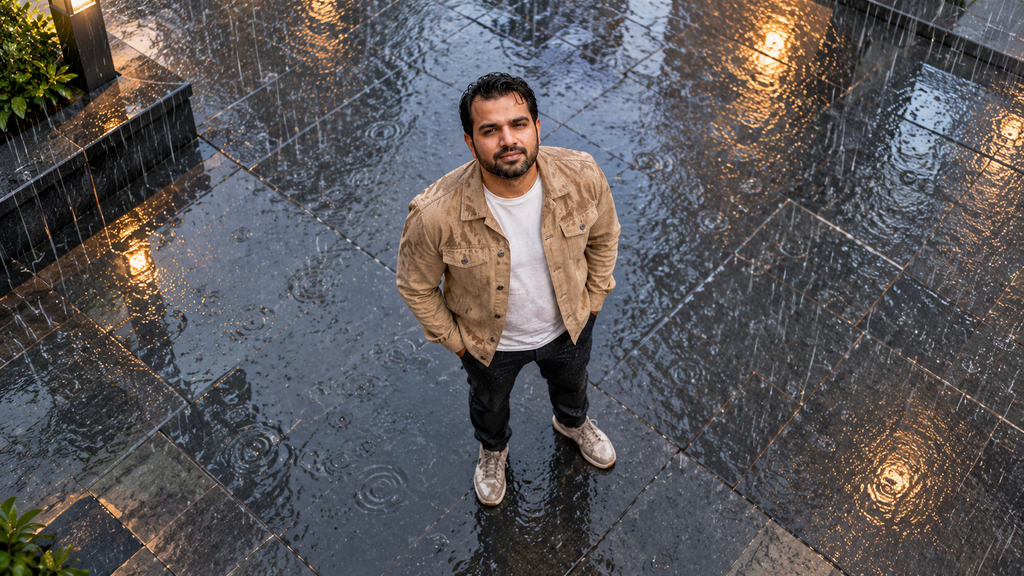
2. Bird’s-Eye Portrait in Monsoon Rain
Short prompt:/birdview/wide/monsoon
A bird’s-eye portrait uses an elevated camera looking down at the subject. Wet paving, puddles and reflected lights make the overhead composition more interesting.
Copy-and-paste prompt
Transform my uploaded photo into a photorealistic wide bird’s-eye portrait during heavy monsoon rain. Preserve my recognizable facial identity, hairstyle, build and outfit. Position the camera high above me, looking steeply downward. Show my full body standing on a rain-soaked outdoor plaza, with my head looking up toward the camera so my face remains visible. Include realistic falling rain, puddle ripples, wet paving and soft warm reflections from nearby lights. Make my hair and clothing naturally rain-damp. Use subdued blue-gray overcast lighting and a landscape 16:9 composition. Remove any sticker outline or cutout background. No text or watermark.
What our example showed
The result included an elevated viewpoint, visible rain, wet clothing and warm reflections across the paving.
Asking the subject to look up toward the camera helped keep the face visible. Without that instruction, a steep overhead view may show mostly the top of the head.
Correction prompt:
Raise the camera viewpoint further and show more wet ground around me. Keep my face visible as I look upward.
3. Ultra-Close-Up Rain Portrait With Bokeh
Short prompt:/ultracloseup/bokeh/rain
Bokeh describes the appearance of out-of-focus areas, often visible as soft circles of light. Combined with a tight crop and rain droplets, it creates an intimate portrait.
Copy-and-paste prompt
Edit my uploaded photo into a photorealistic cinematic ultra-close-up rain portrait. Frame my face tightly from the upper forehead to the chin. Preserve my recognizable facial identity, age, skin tone, hairstyle and expression. Keep my eyes and central facial features sharply focused. Add realistic fine raindrops on my skin and damp hair, with a few falling rain streaks. Use a very shallow depth-of-field look and a softly blurred blue-gray background with restrained warm light bokeh. Preserve natural skin texture. If I wear glasses in the reference, keep them and avoid droplets obscuring my eyes. Create a square composition. No text or watermark.
What our example showed
The close-up displayed droplets on the skin and glasses, with warm background lights contrasting against cool rain tones.
This style also makes small changes in facial appearance easier to notice. Review it at full size before using it as a profile image.
Correction prompt:
Match my face more closely to the reference. Reduce droplets over my eyes and keep natural skin texture without smoothing.
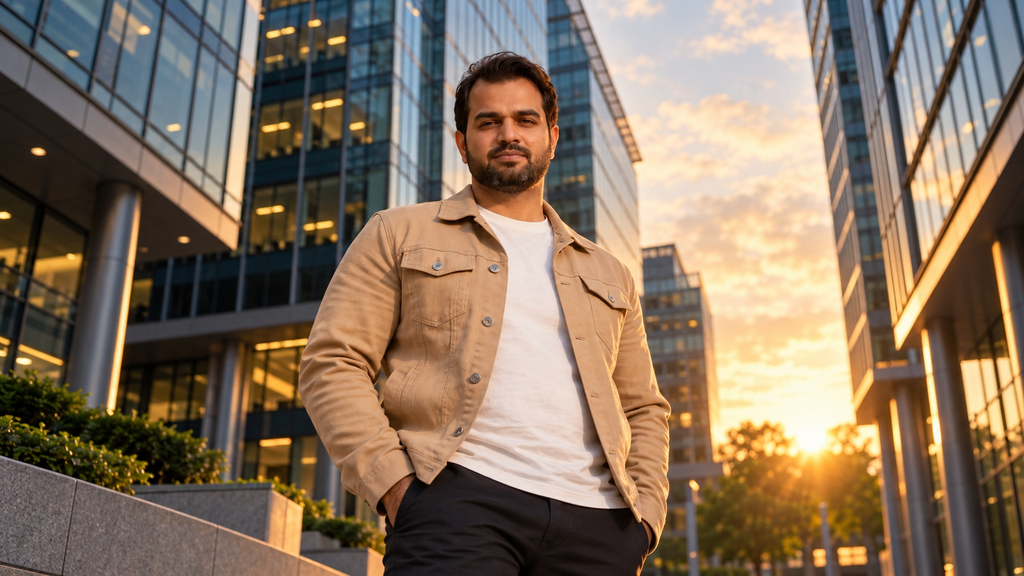
4. Low-Angle Cinematic Portrait With a 35mm Look
Short prompt:/lowangle/35mm/cinematic
A low-angle portrait places the camera below the subject and points it upward. In an architectural setting, this lets buildings rise behind the person.
Copy-and-paste prompt
Edit my uploaded photo into a photorealistic cinematic low-angle portrait with a natural 35mm full-frame lens look. Preserve my recognizable face, hairstyle, beard if present, outfit and expression. Place the camera below waist level and angle it upward. Keep realistic facial and body proportions without fisheye distortion. Retain or create a modern architectural setting with buildings rising behind me. Use warm sunset edge lighting, softly cool shadows, controlled contrast and subtle film grain. Keep my face sharp with gentle background separation. Create a landscape 16:9 composition. No text or watermark.
What our example showed
The lower viewpoint made the office buildings appear taller and gave the portrait a confident feel. Warm sunset lighting added separation around the subject.
A low viewpoint can also exaggerate nearby body parts. Use a moderate angle if the result feels distorted.
Correction prompt:
Make the low angle more subtle. Preserve natural proportions while retaining the architectural background and sunset lighting.
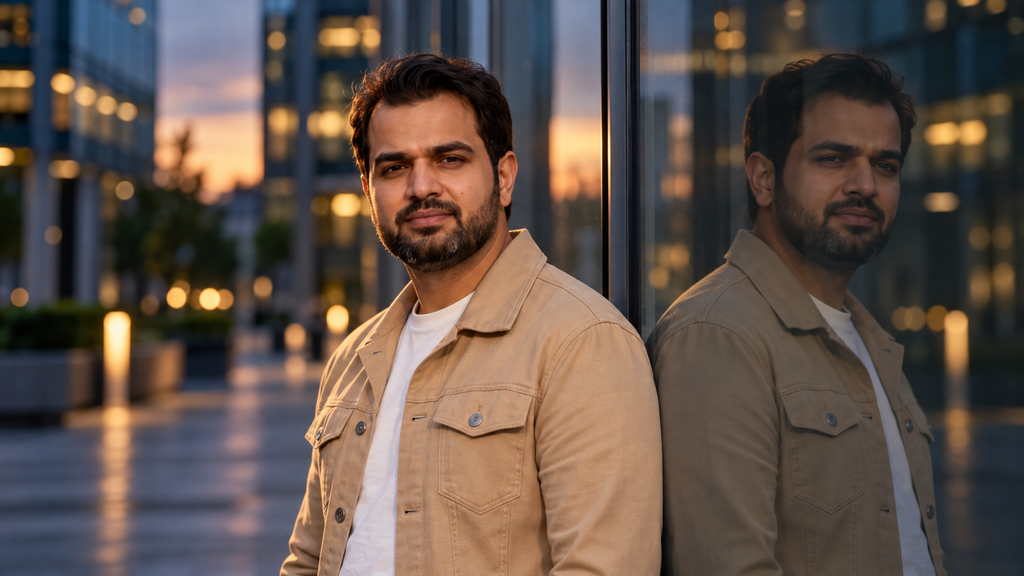
5. Moody Reflection Portrait With an 85mm Look
Short prompt:/reflection/85mm/moody
This style pairs a clear portrait with a darker reflection in glass. The 85mm instruction suggests a portrait lens appearance with soft background separation.
Copy-and-paste prompt
Create a photorealistic moody portrait from my uploaded photo. Preserve my recognizable facial identity, hairstyle, skin tone, build and outfit. Position me beside a reflective glass facade, with my reflection visible alongside me. Use chest-up framing and an 85mm full-frame portrait lens look, with my face sharply focused and distant lights rendered as soft bokeh. Show a subtle three-quarter angle and a calm, contemplative expression. Use dusk lighting, cool blue-gray shadows and restrained warm edge light. The reflection must mirror the same person, clothing and pose with plausible glass geometry. Create a landscape 16:9 composition. No text or watermark.
What our example showed
The glass reflection created a second visual focal point while the background lights remained soft.
Reflections deserve extra checking. An attractive image can still contain mismatched shoulders, clothing or head angles.
Correction prompt:
Correct the reflection so it matches my pose and clothing. Keep it slightly darker than the real subject, as a reflection in glass.
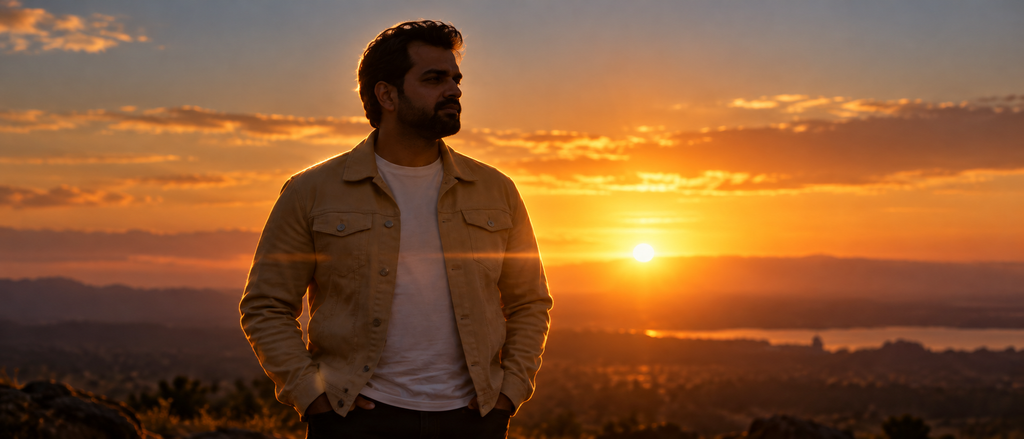
6. Sunset Silhouette With Anamorphic Framing
Short prompt:/silhouette/anamorphic/sunset
A silhouette emphasizes the subject’s outline against a brighter background. Anamorphic styling adds a wide cinematic composition and can suggest horizontal lens flare.
Copy-and-paste prompt
Transform my uploaded photo into a photorealistic cinematic sunset silhouette. Preserve my characteristic hairstyle, facial profile, build and outfit. Remove any sticker outline, border or cutout background. Show me in a three-quarter profile against a bright sunset horizon. Keep most of my face and body in shadow, with fine golden rim lighting around my hair, face, shoulders and clothing. Use wide anamorphic-style framing at approximately 2.39:1, an orange-gold sky, realistic atmospheric haze and a subtle horizontal lens flare. Keep the scene natural and uncluttered. No text or watermark.
What our example showed
The generated image used wide framing, a bright horizon and golden edge lighting. Some clothing and facial detail remained visible, making it a partial silhouette.
For a stronger silhouette, request deeper shadows. Expect less visible facial detail as the silhouette becomes darker.
Correction prompt:
Darken the subject into a stronger silhouette while preserving the outline and golden rim light. Keep the sunset unchanged.
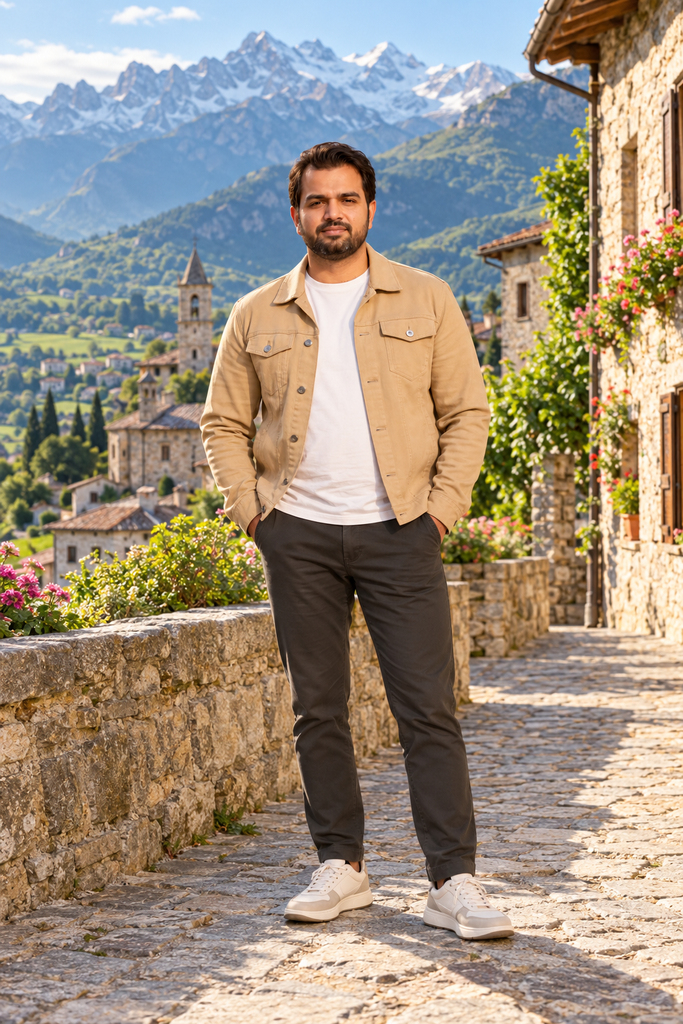
7. Full-Body Travel Portrait With a 35mm Look
Short prompt:/fullbody/35mm/travel
A full-body travel portrait shows both the person and the destination. The background should provide context without making the subject too small.
Copy-and-paste prompt
Edit my uploaded photo into a photorealistic full-body travel portrait with a natural 35mm lens look. Preserve my recognizable facial identity, hairstyle, skin tone, build and outfit. Show my complete body from head to shoes, with comfortable space above my head and below my feet. Place me on a scenic mountain village walkway with stone buildings, a green valley and distant mountains. Use natural warm morning light, realistic proportions and gently softened distant scenery. Keep my face recognizable and the pose relaxed. If my lower body is missing from the reference, use simple dark trousers and neutral sneakers. Create a portrait 2:3 composition. Remove any sticker border. No text or watermark.
What our example showed
The result extended the supplied portrait into a complete outfit and placed the subject on a stone walkway with mountains behind him.
Because the reference did not show the full body, the trousers, footwear and lower-body details were generated. They should not be treated as an exact reconstruction of the original person.
Correction prompt:
Keep the destination and lighting unchanged. Show both shoes fully and make the body proportions more natural.
How to Keep Your Face More Consistent
Identity preservation is a request, not a guarantee. A generated edit may change small details even when it looks convincing.
Add this instruction to any prompt:
Use the uploaded image as the primary identity reference. Preserve my facial proportions, eye shape, nose, lips, skin tone, hairstyle and age. Change the scene and photographic style while keeping my appearance as close as possible to the reference.
For better control:
Use a sharp reference with an unobstructed face.
Describe accessories you want to keep.
Avoid requesting major changes to age or facial structure.
Review each result against the original.
Change one issue at a time.
Reattach the original if the conversation loses access to it.
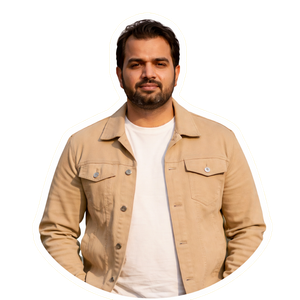
If you upload a cutout with a white outline, explicitly request removal of the outline and replacement of the background.
Common Problems and How to Fix Them
Problem
What to request
Face looks different
“Restore my facial proportions closer to the original reference.”
Skin looks artificial
“Preserve natural skin texture and remove excessive smoothing.”
Motion blur covers the face
“Apply blur only to the background and outer edges.”
Feet are cropped
“Show the complete body, including both shoes and space below them.”
Rain looks unrealistic
“Use fine rain streaks, varied droplets and subtle puddle ripples.”
Reflection does not match
“Make the glass reflection consistent with the subject’s pose.”
White cutout border remains
“Remove the sticker outline completely and blend the subject naturally.”
Camera angle is unclear
“Place the camera high overhead” or “place it below waist level,” as appropriate.
What if you see “Could not read the local image”?
That message indicates the image could not be accessed at the specified location. It is not part of the creative prompt.
Reattach the photo and send the editing instructions again. Copy only the style phrase or detailed prompt—leave out file paths and error messages.
A Reusable Cinematic Photo Prompt Formula
You can build your own version with this structure:
Edit my uploaded photo into [style]. Preserve [identity and clothing details]. Use [camera angle], [framing or lens look], [setting] and [lighting]. Keep [important details] sharp. Create [aspect ratio]. Avoid [specific unwanted effects].
For example:
Edit my uploaded photo into a cinematic evening portrait. Preserve my face, hairstyle and beige jacket. Use an eye-level viewpoint, an 85mm portrait lens look, a quiet city setting and soft dusk lighting. Keep my eyes sharp and the background gently blurred. Create a portrait 4:5 composition. No text, watermark or excessive skin smoothing.
The most useful prompts explain what changes and what stays consistent.
Frequently Asked Questions
Are these official ChatGPT photo editing codes?
No. Phrases such as /pov/wide/motionblur are descriptive shorthand. They communicate a visual idea but are not official commands or fixed presets.
Can I use the short phrase without the full prompt?
You can try it with an uploaded image. A detailed prompt gives clearer direction about identity, lighting, framing and the background.
Will ChatGPT keep my face exactly the same?
Exact preservation is not guaranteed. A clear reference and specific instructions can help, but you should compare the result with the original.
What do 35mm and 85mm mean in an AI photo prompt?
They describe a photographic lens look. A 35mm-style portrait usually includes more environmental context, while an 85mm-style portrait suggests tighter framing and stronger background separation.
Can one selfie become a full-body travel image?
An AI edit can generate a full-body scene from a selfie, but the missing body, clothing and footwear details will be invented. Use a full-body reference when those details matter.
Which prompt should I try first?
Choose the effect you actually want. Low-angle cinematic and full-body travel prompts offer clear starting points; reflections and ultra-close-ups need closer inspection.
Can I make the same result as a reference image?
You can request a similar viewpoint, lighting and composition, but results will vary. Upload the style reference alongside your portrait and explain which image supplies the identity and which supplies the visual style.
ChatGPT Photo Editing FAQs
Do these prompts work with ChatGPT’s image editor?
Yes. They are written for ChatGPT conversations that support image editing: upload your photo, describe the style you want, and ask it to preserve your facial identity and outfit.
What do the /pov/wide/motionblur style codes mean?
They are descriptive shorthand — one phrase for the viewpoint, one for the framing, one for the atmosphere. They are not official ChatGPT commands, programming code, or guaranteed presets; their meaning comes from the words you use.
How do I keep my face looking like me after editing?
Add the identity-preservation instruction: use the uploaded image as the primary identity reference and change only the scene and photographic style. Use a sharp, well-lit reference, describe accessories to keep, avoid asking for major age or facial-structure changes, and review each result against the original.
Why does my face drift after several rounds of edits?
Identity preservation is a request, not a guarantee — repeated revisions slowly change small details. Return to the original reference photo when the drift starts, and reattach the original if the conversation loses access to it.
Can I combine multiple styles in one prompt?
Start with a single effect. Combining rain, motion blur, reflections, and silhouettes in one request makes it harder to assess which instruction needs adjusting.
What kind of photo works best as a reference?
A photo where your face is visible and in focus, with even lighting and a simple background. For full-body results, upload a full-body reference — a headshot forces the system to invent trousers, shoes, and body proportions.
About Me
Hey Friends ! I’m Nabeel, the founder of PromptBeel.com This site is all about making AI image generation awesome for everyone.