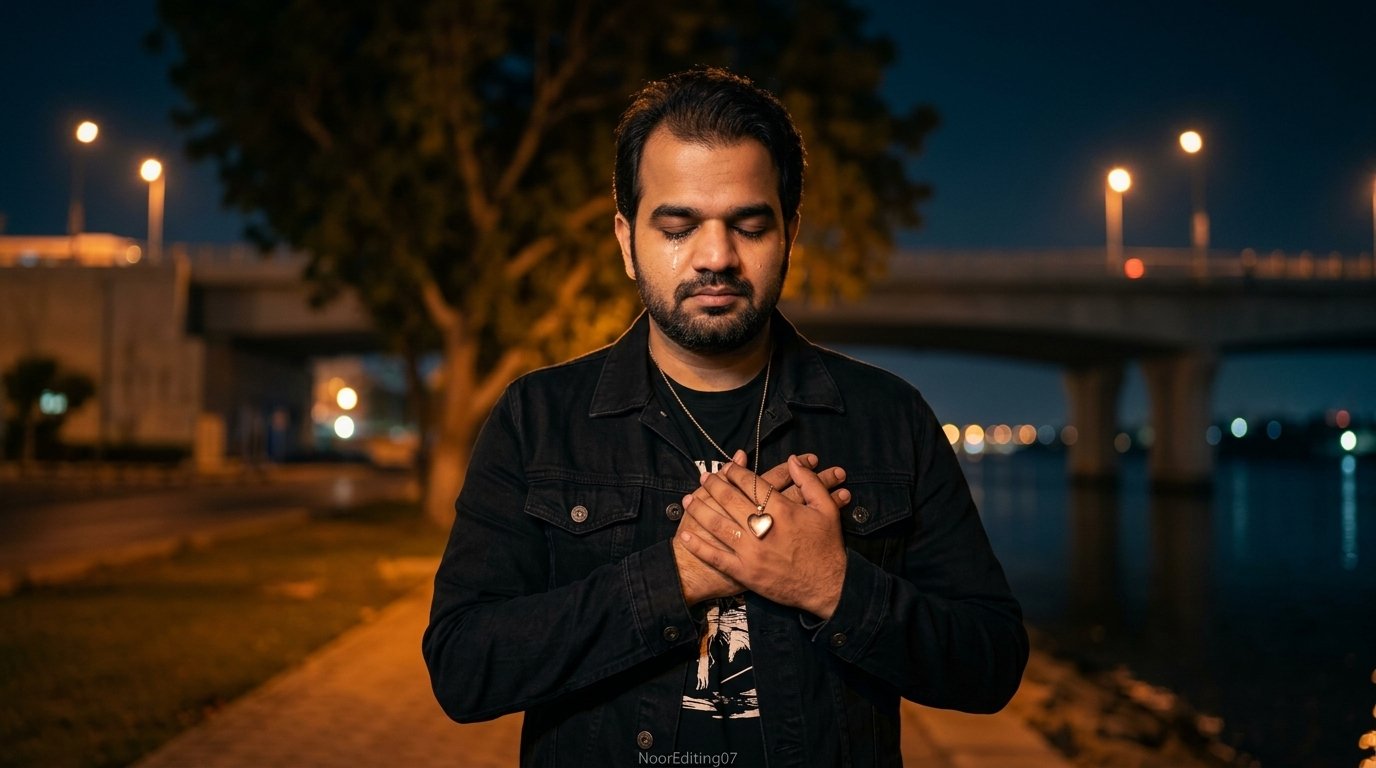
We’ve all had those quiet late-night moments where emotions feel a little too heavy to put into words. If you’ve been browsing Instagram Reels or TikTok lately, you’ve probably noticed those cinematic, moody, late-night AI videos—streetlights glowing softly, cinematic color tones, and a deep, raw storyline of heartbreak that stops your scroll instantly.
The secret behind those breathtaking, Hollywood-grade melancholic visuals isn’t expensive camera gear; it’s a masterfully structured AI video prompt.
In this guide, we are sharing an exclusive, high-retention Sad Night Walk AI Video Prompt designed to maintain 100% facial consistency, dynamic scene transitions, and true-to-life emotional storytelling.
Why Most AI Prompts Fail (And How This One Works)
If you have tried using generic AI video prompts before, you’ve likely run into these frustrating issues:
Facial Drift: The face changes completely from one scene to the next.
Artificial Look: The skin looks either plastic or over-processed.
Disconnected Clips: Instead of a story, you end up with random cuts that don’t make emotional sense.
To fix this, our prompt is engineered around a 7-act visual storyboard. Every single beat is tightly mapped out—from macro close-ups to wide cinematic silhouettes—keeping your character’s identity, clothes, and lighting locked throughout.
The Master AI Video Generation Prompt
Copy the complete prompt below directly into your AI video generator (such as Flow AI, Kling, Luma Dream Machine, or Runway Gen-3):
⚡ AI PROMPT
A cinematic ultra-realistic 4K/8K video (16:9) at night, rich full color grading with warm amber streetlights and deep blue-black sky, of a young man wearing a black denim jacket over a black graphic t-shirt and light beige trousers, standing near a riverside area with a concrete bridge, dry riverbank, and large trees in the background, deeply emotional and melancholic atmosphere throughout. A small, subtle watermark reading ‘NoorEditing07’ stays fixed in the bottom corner throughout the entire video, minimal white or light-colored font, low opacity, appearing only once at all times.CRITICAL: use the uploaded reference photo as the exact identity source — same face, same exact facial features, same natural smooth clear skin with no blemishes or texture flaws, and the exact same body type and build as shown in the uploaded photo, maintained precisely and identically in every single scene with zero facial drift or identity change. This must work accurately for any person of any age or body type who uploads their own reference photo — the generated face, skin, and body must always match the uploaded photo exactly, never a generic or different look.Scene 1: Extreme close-up shot, cropped tightly to only show his hand and the phone — his hand trembles slightly as it holds a smartphone displaying a close-up photo of a young woman’s eyes on the screen, his thumb gently grazing the edge of the screen as if wanting to touch her face, a silver wristwatch visible on his wrist, his own face and body deliberately not visible in frame, only the hand, phone, and the eyes on the screen, soft ambient light, a heavy quiet sorrow in the stillness, cinematic macro framing.Scene 2: Wide shot from behind — he walks slowly and heavily along a riverside path at night, shoulders slightly slumped, a concrete bridge lit by distant streetlights stretching across the water behind him, warm amber ambient glow, lonely atmosphere.Scene 3: Medium front shot — he walks forward toward the camera along the riverside path at night, eyes distant and glassy, a faint tremble of emotion in his expression, bridge lights glowing softly behind him.Scene 4: Wide shot from behind — he stands still and slowly spreads both arms open as if letting go of something painful, head tilted slightly down, facing the bridge and dark water at night, streetlights glowing along the bridge railing, a powerful release of buried emotion.Scene 5: Wide shot — he stands beneath a large tree beside the river at night, head bowed low, shoulders heavy with grief, string lights or distant lamps casting a warm amber glow, deep stillness.Scene 6: Medium front shot — he walks toward the camera along the riverbank at night, a single tear catching the warm light on his cheek, the large tree and glowing distant lights behind him, raw vulnerable expression.Scene 7: Close-up final shot — he stands still, holding a small pendant on a chain close to his chest with both hands, eyes closing gently as he presses it to his heart, warm night ambient light gently illuminating his face, cinematic slow zoom-in on his quiet heartbreak to finish.Overall style: same face, same identity, same natural smooth skin, same exact body type as the uploaded reference photo, same black denim jacket, black graphic t-shirt, and beige trousers outfit consistent in every single scene, no outfit change, no identity or body change, same real riverside and bridge locations at night throughout, natural continuous movement and deeply emotional poses with distinct camera angles in every scene, realistic skin and fabric texture, rich full night-time cinematic color grading with warm amber streetlights, deep blue-black sky, and glowing ambient highlights — not desaturated, not black and white, full natural color throughout — filmic depth and contrast, evocative melancholic mood, smooth cinematic transitions between poses, ultra-realistic premium 4K/8K quality, 16:9 widescreen format, continuous emotional heartbreak story flow from start to end, no scene skipped, only 7 scenes total exactly as described.Watermark (final instruction): keep a single small, subtle, clean text watermark reading ‘NoorEditing07’ fixed in the same bottom corner position throughout the entire video, minimal white or light-colored font, low opacity, non-intrusive, appearing only once on screen at any given time.
Step-by-Step Guide: How to Use This Prompt
Step 1: Pick a Clean Portrait Photo
Upload a sharp, front-facing reference image where your face and shoulders are well-lit. Avoid heavy filters, extreme angles, or sunglasses—the AI needs clear biometric markers to lock your identity across the 7 scenes.
Step 2: Set the Aspect Ratio
For Instagram Reels / TikTok / YouTube Shorts, choose 9:16.
For YouTube Long-form / Cinematic Web Player, keep the prompt’s default 16:9.
Step 3: Customize the Details
Watermark: If you have your own brand name or creator tag, simply replace 'NoorEditing07' with your own handle.
Wardrobe: While the black denim jacket and beige trousers provide a timeless aesthetic, you can swap it for an overcoat, dark hoodie, or casual leather jacket.
Step 4: Add Background Score in Post-Production
To make your video truly viral, drop the generated video into CapCut or Premiere Pro. Add:
Soft rain or ambient night city noise (low volume).
A slow-reverb piano or melancholy lo-fi soundtrack.
Slight film grain (10–15% opacity) for that rich, organic 35mm feel.
Final Thoughts
Emotional storytelling wins every time on social media. With this prompt, you don’t need an entire production crew or hours of filming in the cold to create a poignant piece of art.
Give it a try, paste it into your favorite tool, and see your story come to life frame by frame!
About Me
Hey Friends ! I’m Nabeel, the founder of PromptBeel.com This site is all about making AI image generation awesome for everyone.